
Top 10 Jira Issues by Time in Review
Rank Jira issues by Time in Review, show the top 10 with their priorities and group the rest as Other on your Jira dashboard with Performance Objectives.
Code reviews, testing, and approvals are essential steps in software delivery. But when work items spend too long waiting for review or feedback, they can become bottlenecks that affect development cycles and delivery timelines.
Even as AI-powered development tools and agents such as Atlassian Rovo Dev accelerate coding and assist with reviews, teams still need visibility into how efficiently work moves through their workflows.
In this use case, we’ll demonstrate how to identify the Top 10 Jira issues by Time in Review, analyze their priorities, and explore the remaining issues using the Top X and Other functionality in Performance Objectives for Jira.
Why Track Time in Review in Jira?
Review time is an important indicator of software delivery efficiency. Whether development is handled by engineers, supported by AI assistants, or delegated to autonomous agents, prolonged review stages, including code review time, can create bottlenecks that affect delivery timelines.
Extended review durations may point to overloaded review queues, unclear requirements, complex changes, or delays in feedback and approvals.
As AI-assisted coding becomes more common, monitoring review processes is particularly relevant. A 2026 Harvard study by Fiona Chen and James Stratton, Artificial Intelligence in the Firm: Bottlenecks in Software Production, suggests that faster code generation can shift bottlenecks toward code review and verification.
Tracking Time in Review helps teams:
- Identify bottlenecks: Find work items accumulating unusually long review times.
- Prioritize investigations: Focus on the issues with the greatest delays, considering their business priority.
- Improve workflow efficiency: Investigate recurring causes of waiting time, repeated feedback, and review delays.
- Support continuous improvement: Use historical data to evaluate the impact of process changes.
The Time in Status metric in Performance Objectives calculates duration directly from Jira issue history. No additional custom fields or manual time tracking are required.
Keep in mind that Time in Review measures the duration an issue spends in the configured Jira status. It may include waiting, automated checks, and other activities, not only the time someone actively spends reviewing code.
Identify the Top 10 Jira Issues with the Longest Review Times
When analyzing many Jira issues, displaying each item on a chart makes it difficult to identify the most significant outliers.
With Performance Objectives, you can rank issues by their calculated Time in Review, display only the first 10, and combine the remaining results into Other.
In our example, we’ve also stacked the chart by Priority to add context to the review durations.
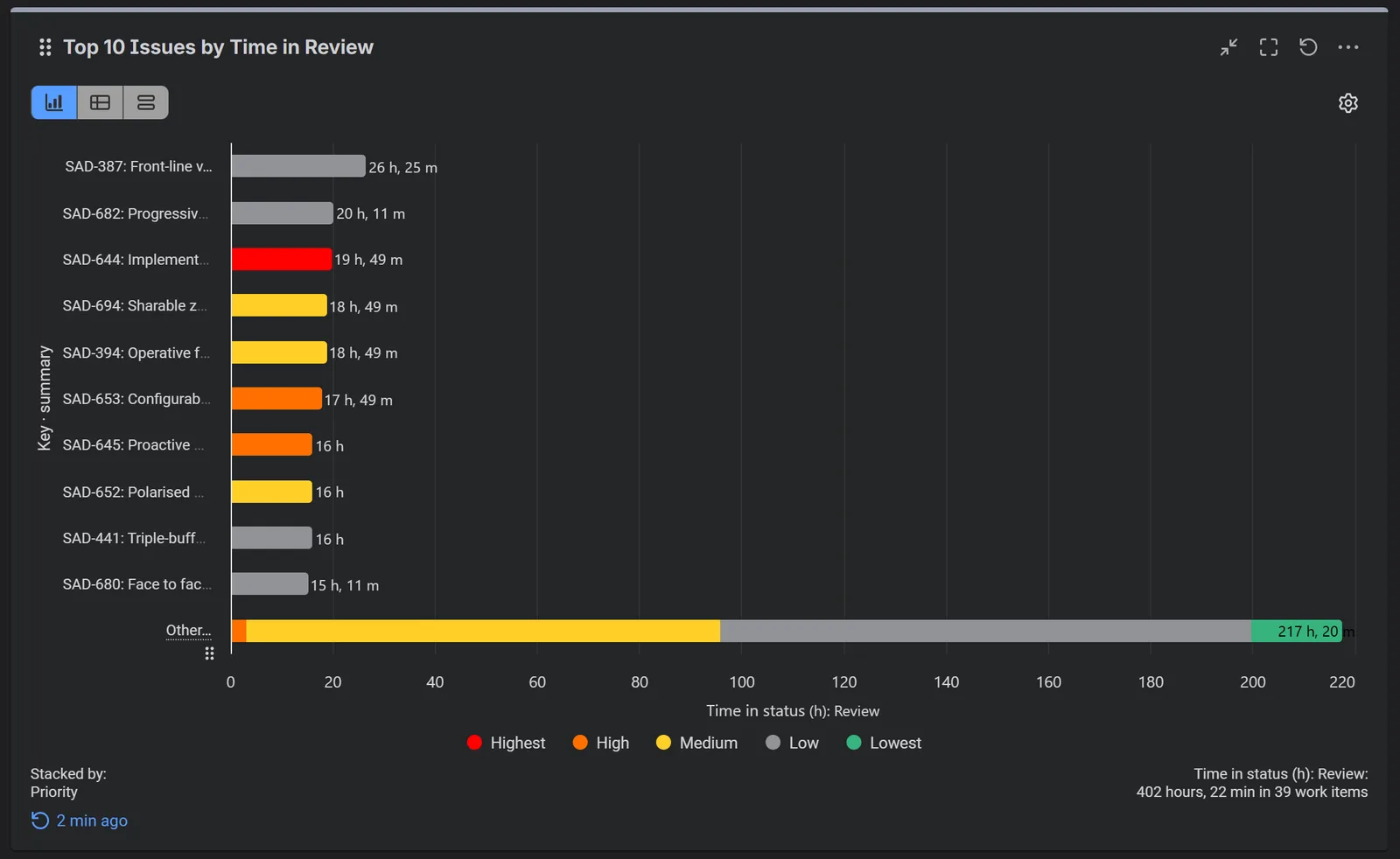
Our sample report analyzes 39 Jira work items, with a total of 402 hours and 22 minutes recorded in Review. A few insights stand out:
- The Top 10 issues (26% of all work items) account for approximately 46% of total review time, indicating that a relatively small number of issues consume a significant share of review time.
- Low- and Medium-priority issues contribute 71% of the Top 10’s review time.
- While longer review durations for lower-priority work may reflect intentional prioritization rather than a problem, recurring delays can still affect delivery.
Analyzing review time alongside issue priorities helps teams identify potential bottlenecks and decide where improvements are needed.
How to Configure a Top 10 Time in Review Report in Jira
You can create this report directly on your classic Jira dashboard using the Performance Objectives gadget.
Step 1: Define your Data Source. Select the Jira projects, saved filters, or work items you want to analyze. Narrow the scope by any relevant criteria.
For a historical review analysis, consider using completed issues from a defined period. To monitor work still moving through the review process, include unresolved issues.
Step 2: Select the Time in Status Metric. Choose Time in Status, select the Review status (or its equivalent in your workflow). You can also configure a team calendar if you want to measure working time rather than continuous elapsed time.
Step 3: Display the Top 10 Jira Issues. Select Key · summary for the Display by field. Choose what is shown on the chart: the issue key, the summary, or both.
Sort the results by the metric value in descending order so the issues with the longest review times appear first. Then, under Show, choose Top and enter 10 to display the first 10 results in the selected sorting order.
Keep Group the rest as Other turned on to aggregate all remaining issue values into a single category on the chart.
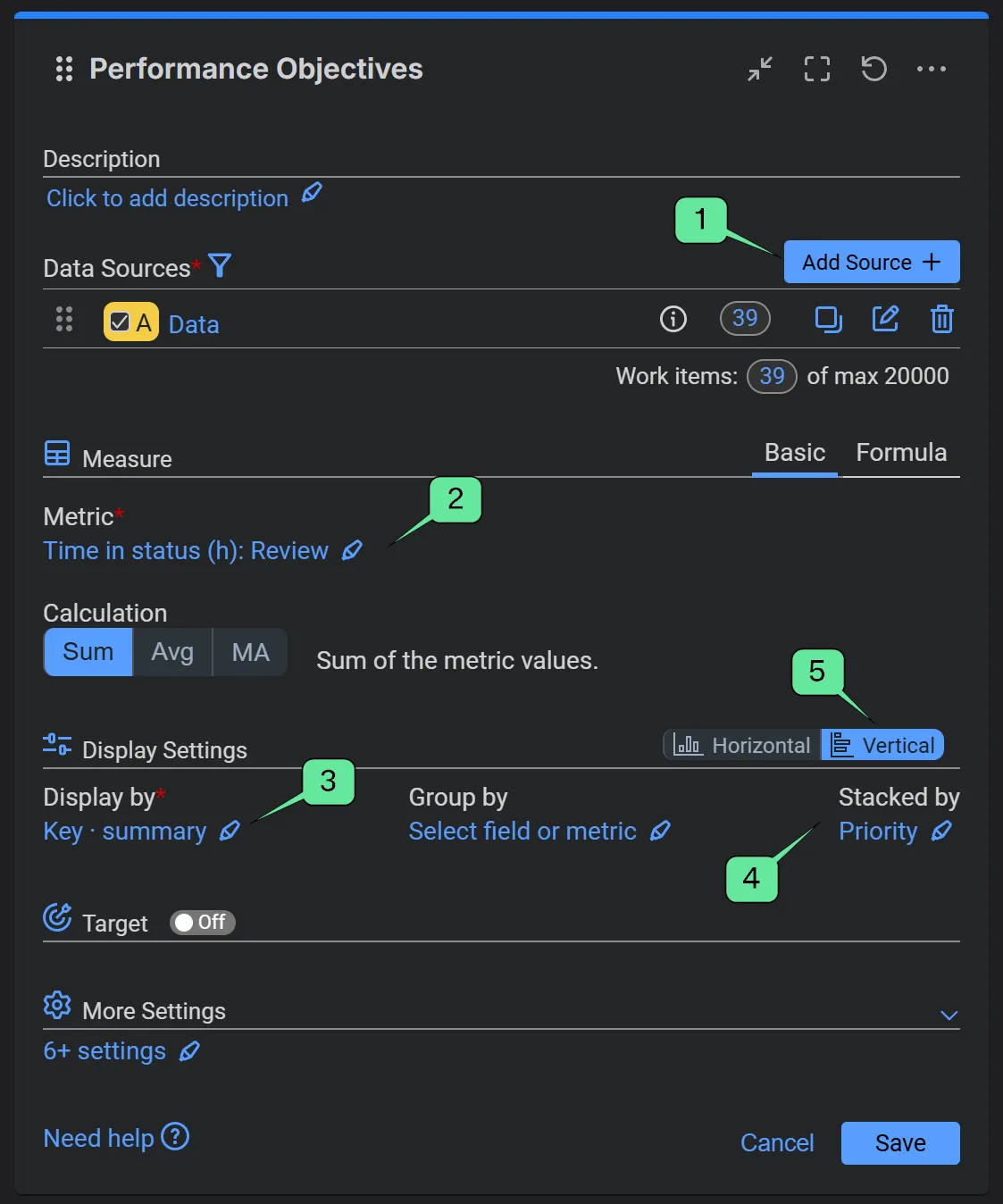
Steps 2 and 3 in details:
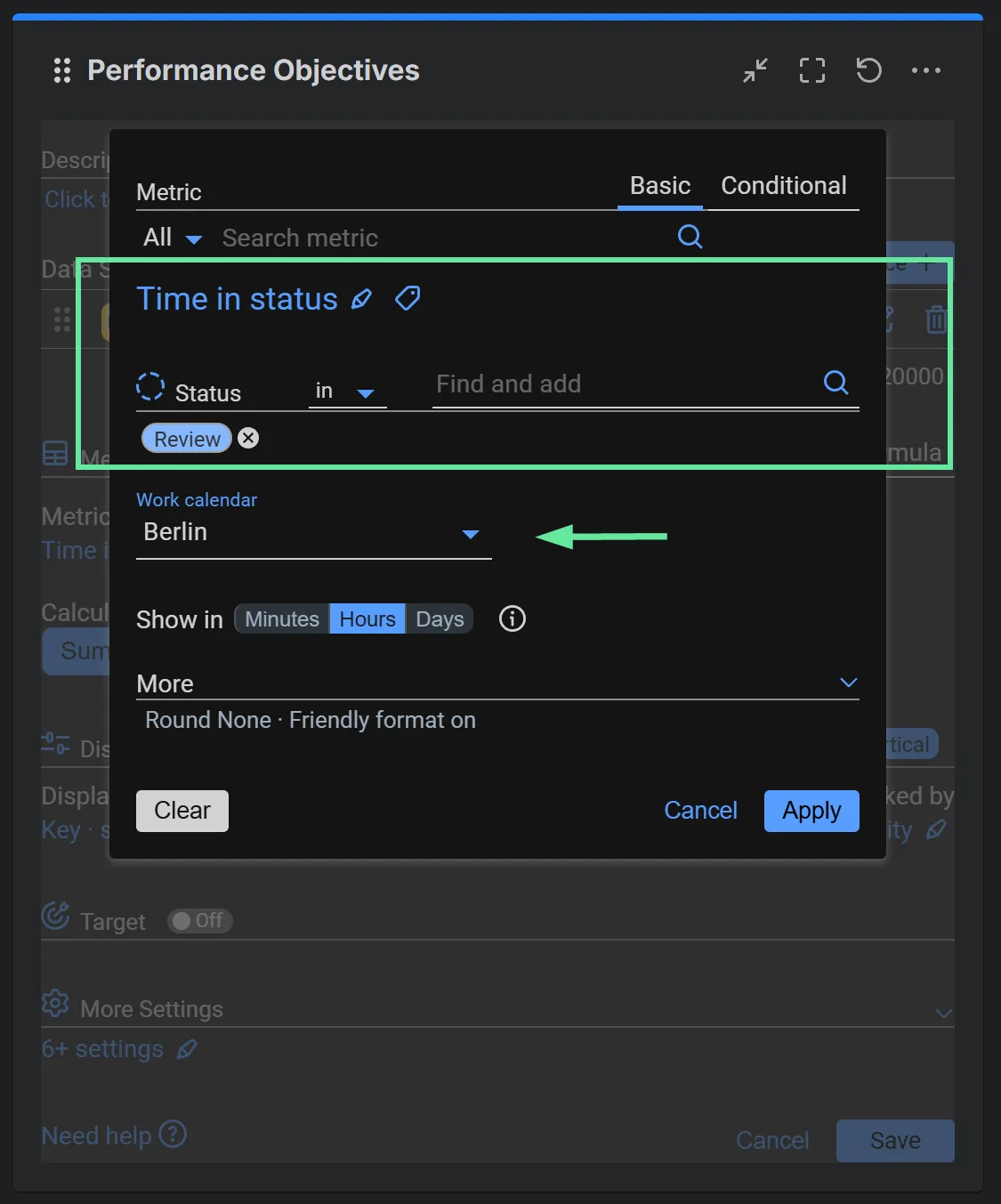
Step 2: the Time in Status metric for the Review status, in hours, on a team work calendar.
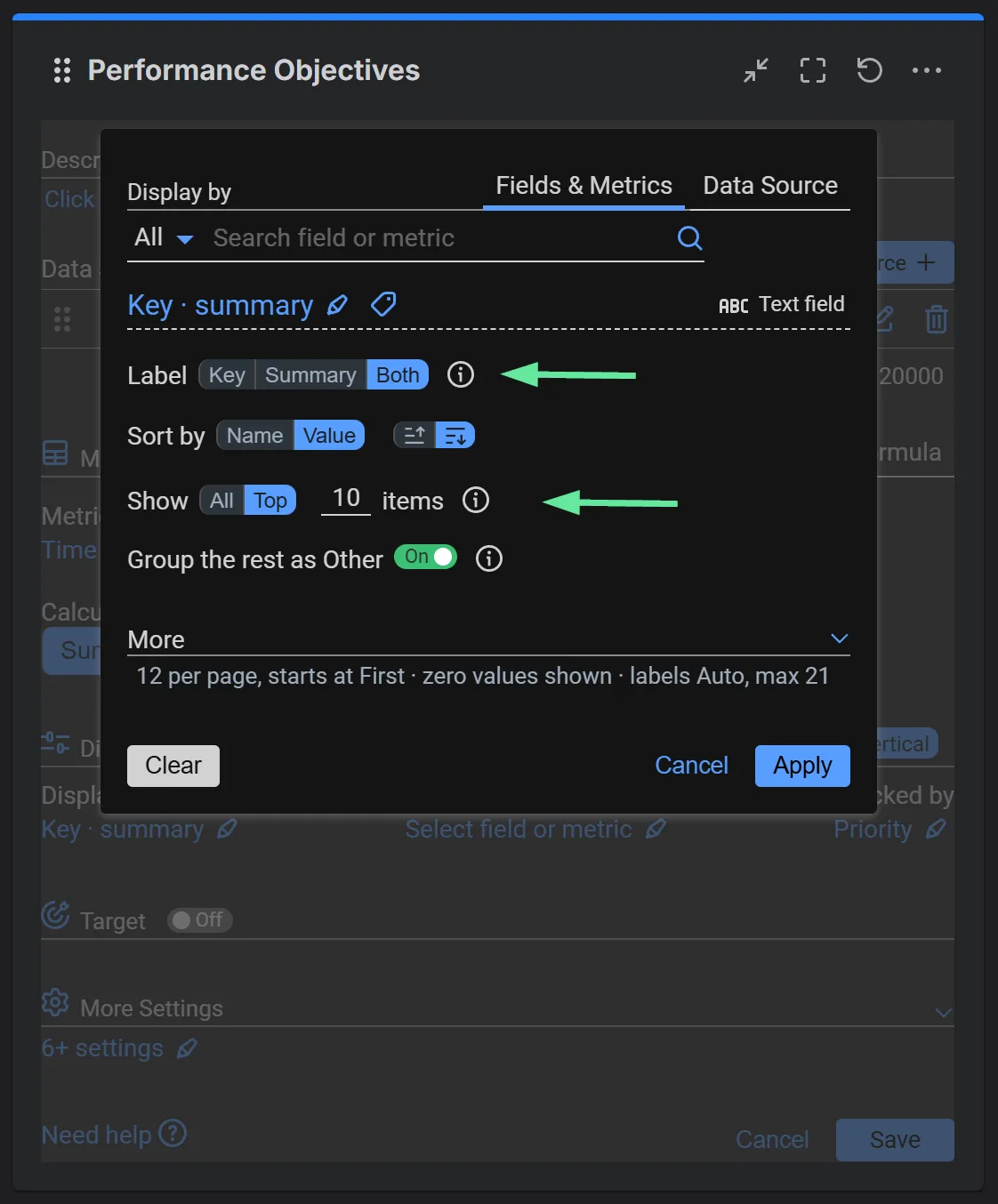
Step 3: Key · summary sorted by value, Show set to Top 10, the rest grouped as Other.
Step 4 (Optional): Stack the Results by Priority. Select Priority for the Stacked by field, or another field that will give you additional context.
Step 5: Choose the Chart Layout. Select the Vertical layout to display issue labels alongside horizontal bars, and save the configuration.
Explore Other: What Happens Beyond the Top 10?
Limiting a chart to the largest values improves readability, but smaller items can collectively represent a substantial part of the overall result.
That’s where Other becomes particularly useful. With the app’s interactive chart exploration options, you can explore the items grouped under Other in a dedicated chart or open the contributing issues in Jira.
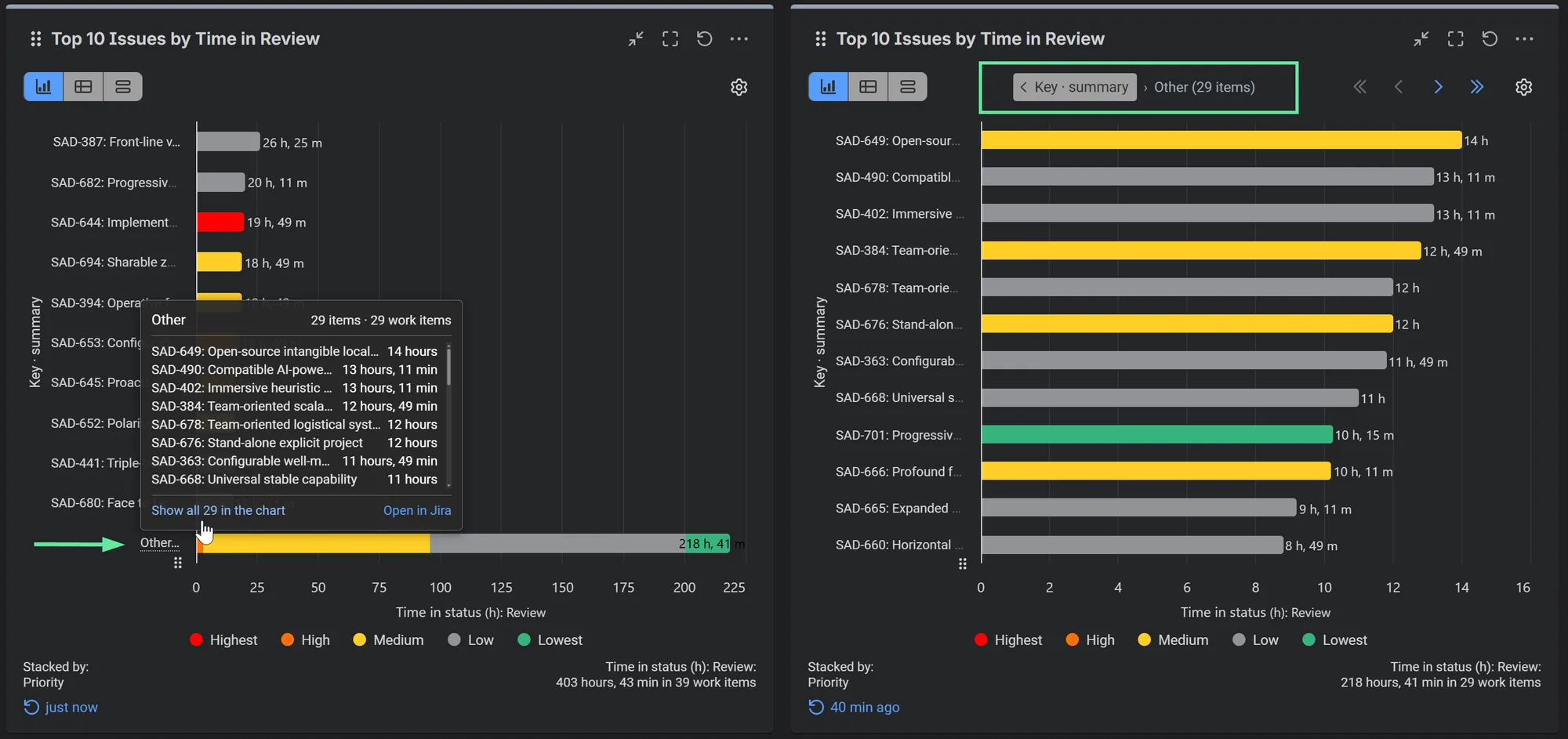
Hover or click Other… to see the grouped issues with their review times (left). Show all 29 in the chart opens them as their own chart, with a breadcrumb to return to the Top 10 (right), and Open in Jira lists them in Jira.
This helps answer questions such as:
- Are the longest review delays concentrated in a small number of issues?
- Does the remaining workload consist mainly of lower-priority work?
- Could smaller but recurring delays be contributing to overall delivery inefficiency?
More Jira Reports You Can Create with Top X, Custom Items, and Other
The same functionality can be combined with different metrics and Jira fields to create many other reports:
- Top 10 Issues by Time in Testing: Identify work items spending the longest time in QA or testing stages, with an optional breakdown by Priority or Issue Type.
- Top 10 Most Reworked Issues: Use Cycles in Status to identify Jira issues repeatedly returning to Review, Testing, or In Progress.
- Top 10 Issues by Estimation Overrun: Compare estimated and logged effort to highlight work items with the largest deviations from the original estimates.
- Top 10 Epics by Logged Work Hours: Discover which initiatives consume the most recorded development effort, while grouping smaller epics under Other.
- Top 10 Components by Average Resolution Time: Identify product areas associated with longer issue resolution cycles and examine the combined contribution of the remaining components.
By combining flexible ranking, custom item selection, interactive charts, and more than 40 supported metrics, Performance Objectives for Jira helps teams move beyond basic issue counts and create focused, actionable reports directly on their Jira dashboards.
Explore the Top X, Custom Items, and Other option or try Performance Objectives on the Atlassian Marketplace to create your own reports.
Related articles
More report examples for Software Development
 Jira SoftwareJira Time in Status Reports: A Practical Guide to Improving Your Workflow
 Time MetricsMax Issue Age KPI
 Service ManagementDecrease the Number of Cycles in Status
 Time MetricsFlow Efficiency Ratio for Jira Kanban Teams
Meaningful Reports for Jira, Made Easy
DevAcrobats develops reporting apps for Jira that extend its capabilities, enabling teams to streamline workflows and enhance performance.