What JQL Can (and Can’t) Do for Jira Change History Searches
Jira Change History Search: Why JQL Alone Isn’t Enough
Jira is a powerful tool for tracking and managing real-time project data, but when it comes to understanding how things have changed over time, it has some limitations. For teams and managers needing insight into historical user activity and specific Jira field changes, native functionality might not cut it. Fortunately, there are solutions.
In this article, we’ll explore the limitations of JQL (Jira Query Language) when it comes to finding historical values, explain which fields are supported for Jira history searches, and introduce a third-party app, the User Activity Timeline, that fills this gap.
What is JQL?
JQL is a text-based language designed to find and filter Jira work. It’s essential for finding work items, reviewing project statuses, and pulling data based on specific criteria. JQL allows you to use operators like = and != to search for exact matches, but when it comes to historical values, it has some constraints.
For current-state queries – finding work items based on their properties right now – JQL works very well. However, for historical analysis – such as determining which issues had specific labels or components two weeks ago, or which issues changed their labels during that period, its capabilities are more limited.
JQL Historical Operators: What You Need to Know
Jira supports several operators for querying previous values:
- was/was not: Returns results where the value of a field was/was not previously a specific value.
- was in/ was not in: Returns results where the value of a field was/not previously one of a set of values.
- changed: Filters work items based on changes to the value of a given field
However, not all Jira fields support historical operators, which is where many users run into problems. This means that the past value of some fields cannot be queried at a specific point in time. This limitation creates a challenge for teams that need access to a broader scope of changes over time – important for auditing, activity reporting, or trend analysis.
Which Jira Fields Support Historical JQL Operators?
To help you better understand where JQL works best for historical searching, we’ve compiled the following table, showing which field types are compatible with history-based operators.
| Field Type |
Supports Historical Operators (WAS, WAS IN, WAS NOT, WAS NOT IN, CHANGED) |
Example queries with historical operators and notes |
|---|---|---|
| Status | Yes with all operators |
|
| Priority | Yes with all operators |
|
| Assignee | Yes with all operators |
|
| Reporter | Yes with all operators |
|
| Resolution | Yes with all operators |
|
| Fix Version | Yes with all operators |
|
| Custom Fields (Date/Number/Text) | No | Changes are recorded and visible in an issue’s history tab, but because these fields are not indexed for JQL history operations, their past values cannot be queried using historical operators. |
| Attachment | No | Attachment changes are visible in the issue history, but historical operators cannot be used with them. |
| Component | No | Component changes are visible in the issue history, but historical operators cannot be used with them. |
| Comment | No | The comments are stored with the issue, but not in a way that allows historical querying of who commented or when a comment was added. |
| Due Date | No | Due date changes are visible in the issue history, but historical operators cannot be used with them. |
| Linked Issue | No | Linked issues are recorded in the issue history, but they are not supported by JQL historical operators. |
| Issue Type | No | Issue Type changes are visible in the issue history, but they are not supported by JQL historical operators, and can only be queried using current-value filters. |
| Labels | No | Label updates are visible in the issue history, but they are not supported by JQL historical operators, and can only be queried using current-value filters. |
| Parent | No | Parent changes are visible in the issue history, but they are not supported by JQL historical operators. |
| Project | No | Changing the project of an issue is a relatively rare action. Project changes are visible in the issue history, but they are not supported by JQL historical operators. |
| Sprint | No | Sprint changes are visible in issue history, but they are not supported by JQL historical operators. |
| Story Points | No | Story Points can be queried in JQL only for their current value, and although their changes are visible in issue history and used in native Jira reports, they are not supported by historical JQL operators. |
| Original/Remaining estimate | No | Changes are visible in issue history, but they are not supported by JQL historical operators and can only be queried using current aggregated values, not past states. |
| Time spent/Worklog data | No | Data such as time logged, author, and date is stored in issue Work log tab, but is not upported by JQL historical operators. |
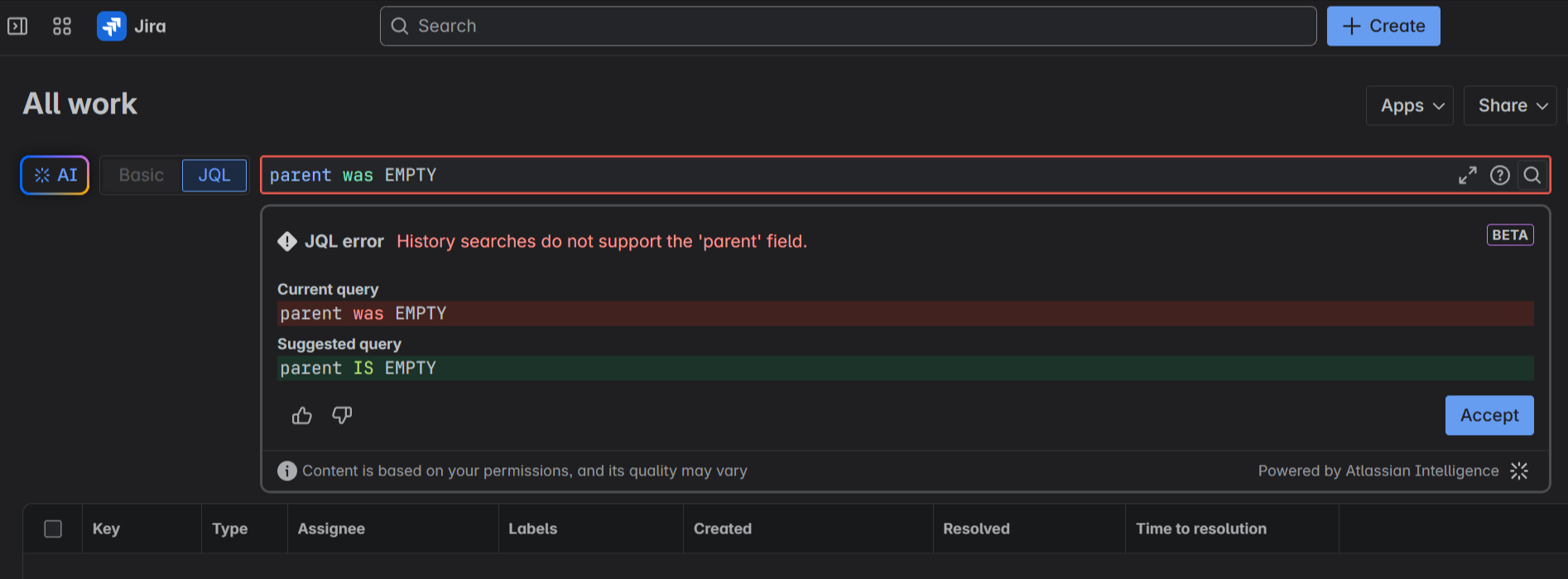
How to Access Jira Issue History Changes JQL Can’t Track
Even though you can see detailed change history in each work item’s history tab, it’s not always possible or easy to search or analyze aggregated change data across issues using JQL. To do that, you typically need other tools, such as using the Jira REST API, webhooks, or audit logs (if you’re an admin). There are some nice third-party apps on the Atlassian Marketplace that use these sources to display lists of changes. However, we didn’t want to build another reporting table. With User Activity Timeline, we aim to go beyond rows and columns of changes and give teams a clear visual overview of their activity over time.
User Activity Timeline: Visual Overview of Team Activity and Jira Change History Over Time
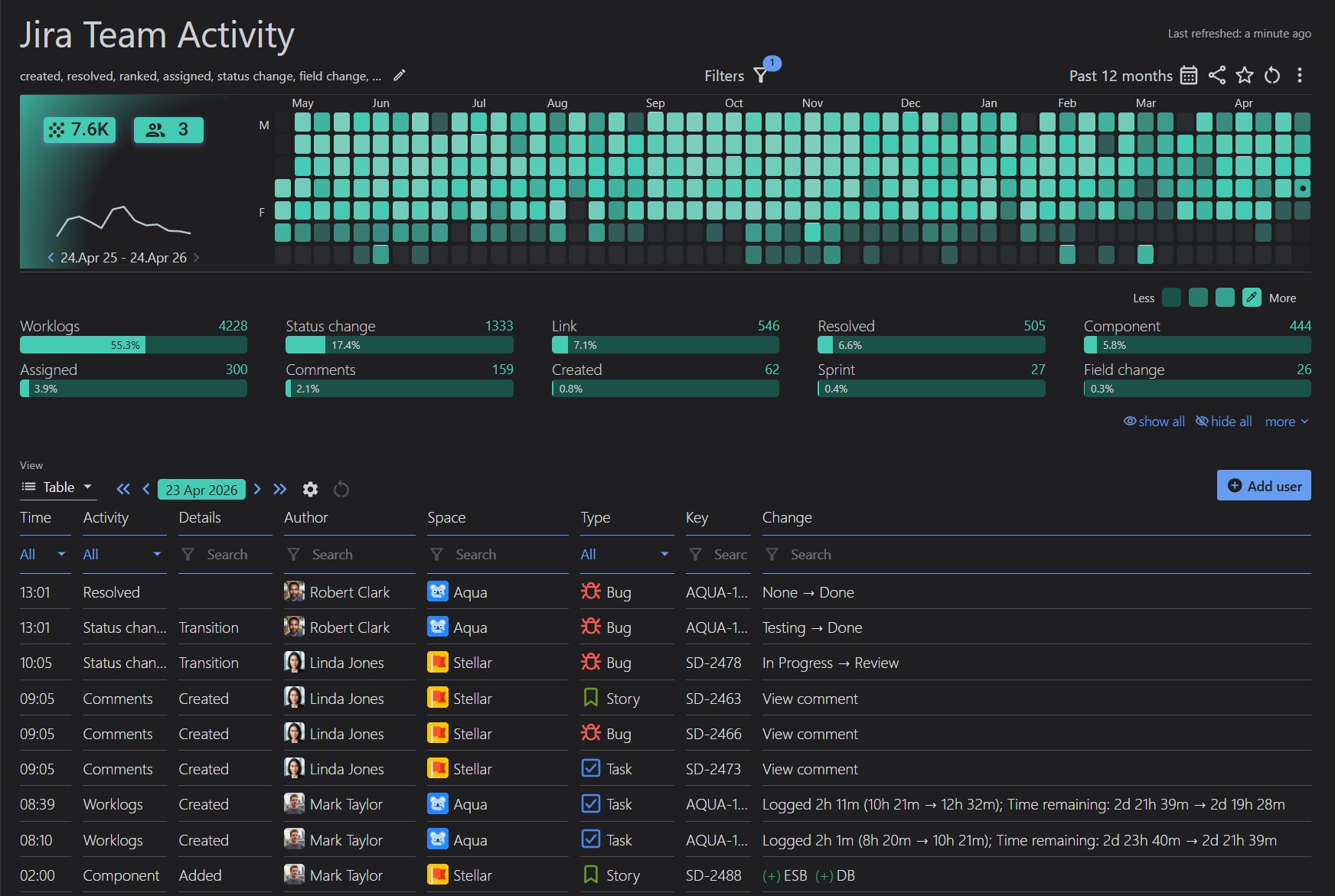
Available now on the Atlassian Marketplace, the User Activity Timeline & History for Jira app by DevAcrobats helps Jira admins, project managers, and team leads easily report on aggregated Jira activity. The app, along with its Jira dashboard gadget, provides insights into both individual and team activity, offering a clear view of who did what and when in Jira. Using an interactive heatmap or trendline chart, it visualizes active and inactive days, making it easy to understand team engagement and activity patterns over time.
In addition to reporting on standard Jira fields and statuses, User Activity Timeline allows you to define custom events for your reports – events that are often not accessible through historical queries in Jira. These include changes such as Story Point or Time re-estimations, Label and Component changes, Sprint changes, Comment edits, Worklog updates, and more. To narrow down the results, you can filter the reports by space, work type, sprint board, epics, saved filters, etc. Click on any day in the heatmap to view a detailed table of changes for that day, then easily navigate to individual issues directly from the report if you need to explore the specifics behind each change.
All fields in the table above marked with ‘No’ for JQL historical queries can still have their past changes retrieved and included in activity reports using the app!
To wrap up, here’s an example of a team report configured in Jira with the User Activity Timeline app:
Check out our Confluence documentation for use cases and step-by-step guides for configuring user and team activity reports in Jira.